![startupscom-logo-420-1.png]](https://help.startups.com/hs-fs/hubfs/startupscom-logo-420-1.png?height=40&name=startupscom-logo-420-1.png)
If you're using an Outlook or Microsoft 365 email account with Investor Matching and your messages aren't sending, SMTP Authentication (SMTP AUTH) is most likely disabled.
You may see an error like: 535 5.7.139 Authentication unsuccessful, SmtpClientAuthentication is disabled for the Tenant.
Enable SMTP AUTH
SMTP AUTH is disabled by default for some Microsoft 365 accounts. To fix this:
- Sign in to the Microsoft 365 Admin Center with an administrator account.
- Go to Users → Active Users.
- Select the affected user.
- Open Mail → Manage email apps.
- Enable Authenticated SMTP.
- Save your changes.
Note: If you're part of an organization, your Microsoft 365 administrator may need to complete these steps for you.
Using a custom email domain?
If your email address uses a custom domain (for example, you@yourcompany.com) instead of @outlook.com or @hotmail.com, you may not have access to these settings.
In most cases, only your email provider or IT administrator can enable SMTP AUTH. If you can't find the setting in your admin portal, contact your email provider's support team and ask them to enable SMTP Authentication (SMTP AUTH) for your mailbox.
Reauthorize Outlook Access in Investor Matching
After enabling SMTP AUTH, go back to your Investor Matching dashboard to reconnect your Outlook account.
-
Navigate to Email & Settings > Email Account Setup.
-
Click Authorize Access with Microsoft.
-
When prompted, select the Outlook IMAP/SMTP option and sign in with your Microsoft credentials.
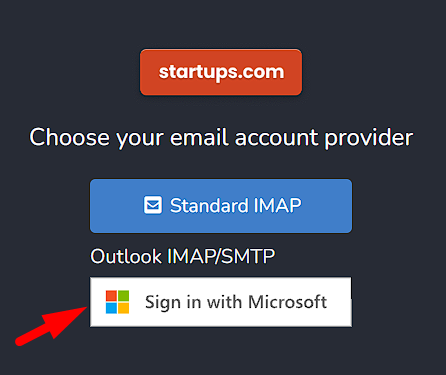
This ensures your Outlook account connects using the correct authentication method.
*Note: During the Microsoft authorization/login process, you may see a pop-up asking you to approve or accept access. Make sure to approve this prompt to complete the connection successfully. Closing or declining the prompt may prevent your Outlook account from connecting properly.
Test the Connection
-
Stay in Email & Settings > Email Account Setup.
-
Click Test Delivery to confirm that the connection is working properly.
If the test succeeds, your Outlook account should now send messages without any errors.
Notes
-
This is a Microsoft-side setting that applies specifically to Office 365/Outlook accounts.
-
If you’re part of an organization, you may need your IT administrator to make the change for you.
-
Once SMTP AUTH is enabled, messages should send normally from your connected Outlook account.