![startupscom-logo-420-1.png]](https://help.startups.com/hs-fs/hubfs/startupscom-logo-420-1.png?height=40&name=startupscom-logo-420-1.png)
Once you’re approved as an Advisor, the Opportunities section will appear in your Advisor dashboard. This is where you can browse Board Seat opportunities that match your expertise, view invitations from founders, and keep track of your applications.
How to Find Your Matched Board Seats
From the main Startups.com page, click Advisor in the navigation menu.
On the left-hand panel, look for Opportunities, then click Matched Seats.
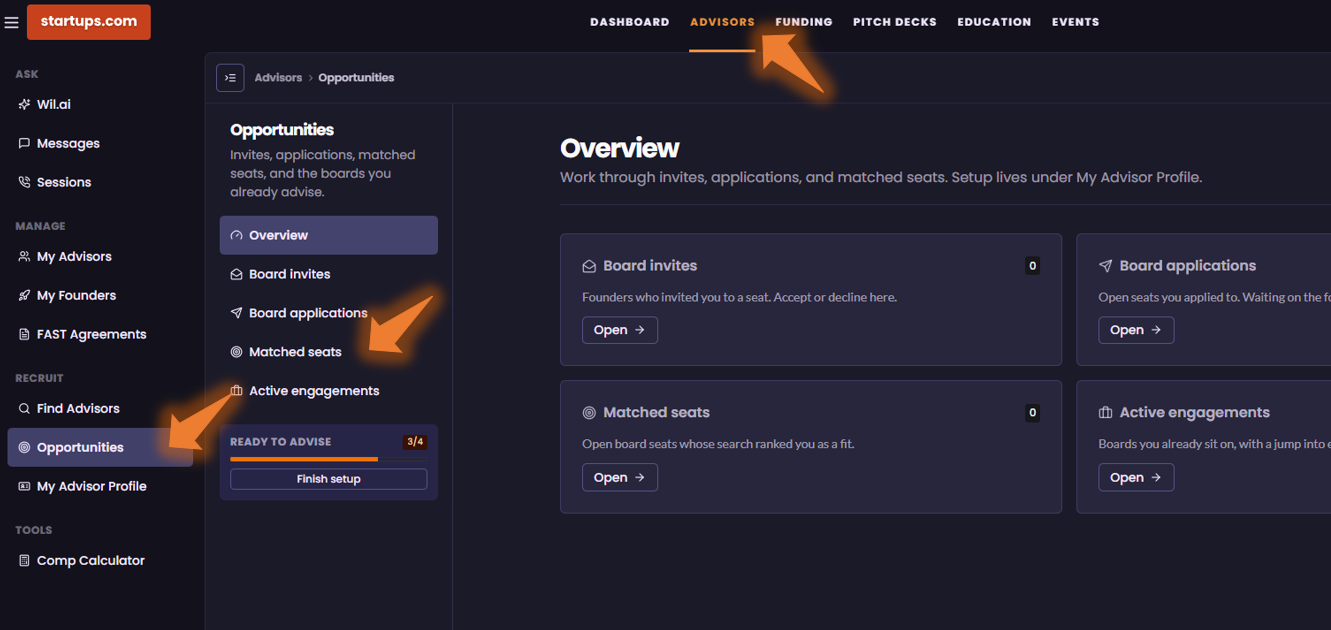
The Matched Seats section shows available Board Seat opportunities that align with your experience and expertise. You can browse through these opportunities and apply directly to any Board Seat that interests you.
How to Find Your Board Invites
Under Opportunities, you’ll also find Board Invites.
This section is where you can view Board Seat invitations sent directly to you by founders who are interested in having you join their board.
How to Check Your Board Applications
To keep track of Board Seats you’ve already applied for, go to Board Applications under the Opportunities section.
Here, you can review the Board Seat opportunities you’ve applied for and check the current status of each application.
Quick Overview
Under Advisor > Opportunities, you’ll find:
- Matched Seats — Browse Board Seat opportunities matched to your expertise and apply.
- Board Invites — View Board Seat invitations you’ve received directly from founders.
- Board Applications — Review the Board Seats you’ve applied for and check their status.