![startupscom-logo-420-1.png]](https://help.startups.com/hs-fs/hubfs/startupscom-logo-420-1.png?height=40&name=startupscom-logo-420-1.png)
If you want to share your request with others (e.g., investors, partners, or your network), you can generate a public-facing version of your request and share it via a link.
What you’ll get
A shareable URL that displays your request in a clean, public view—no login required for viewers.
Before you start
- Your request must already be published (approved).
- Visibility must be set to Everyone (not just members or only you), so anyone with the link can view it.
Steps to create a public view
- Go to My Requests.
- Locate the request you want to share and click View Request.
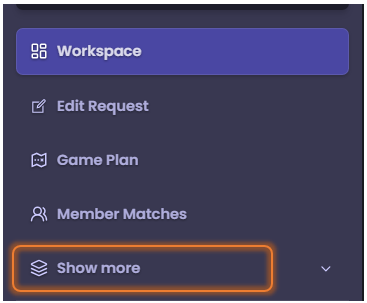
- In the left-hand panel, click Show more.
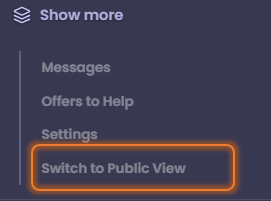
- Select Switch to Public View.
- Once the published view opens, copy the URL from your browser's address bar.
Next step
Share the copied link with your audience for outreach.
Tip
Make sure your request content is complete and polished before sharing, as this is the version others will see.
Note: If the visibility of your request is set to Hidden or Members-Only, sharing the link will not work. The page will appear blank or inaccessible to anyone without the proper permissions. To ensure your request can be viewed externally (e.g., for outreach), make sure its visibility is set to Public.