![startupscom-logo-420-1.png]](https://help.startups.com/hs-fs/hubfs/startupscom-logo-420-1.png?height=40&name=startupscom-logo-420-1.png)
Once you’ve been approved as an Advisor, you can manage when founders can request sessions with you and choose whether you’re currently accepting bookings.
To update your availability, navigate to Advisor > My Advisor Profile > Settings, or go directly to Advisor Profile Settings. Startups
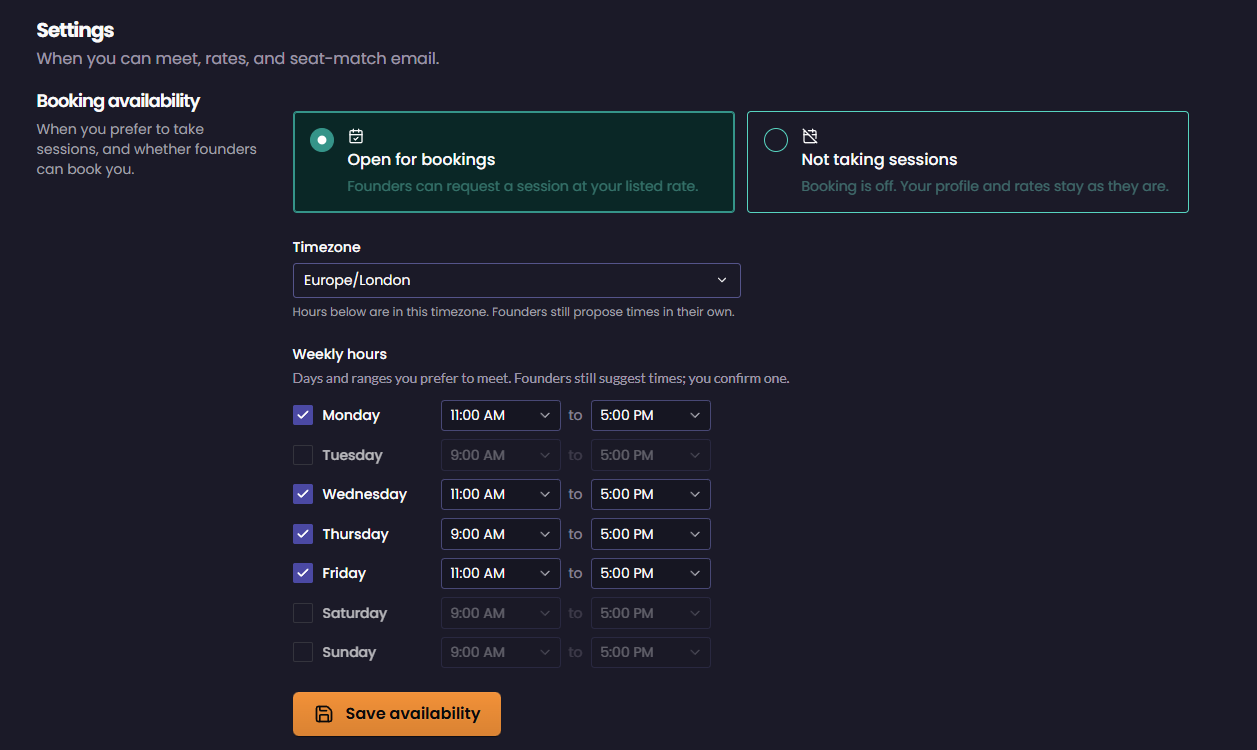
Set Your Booking Availability
At the top of the Settings page, choose whether you’re currently accepting sessions:
- Open for bookings – Founders can request a session with you at your listed rate.
- Not taking sessions – Booking is turned off, but your Advisor profile and rates will remain as they are.
You can return to this page and change your booking status whenever needed.
Set Your Timezone
Under Timezone, select your current timezone from the dropdown menu. Your weekly availability will be based on the timezone you select.
Set Your Weekly Hours
Under Weekly hours, select the days you’re available to meet.
For each available day, choose your preferred start and end time. You can enable or disable individual days depending on your schedule.
Once everything looks correct, click Save availability to save your changes.