![startupscom-logo-420-1.png]](https://help.startups.com/hs-fs/hubfs/startupscom-logo-420-1.png?height=40&name=startupscom-logo-420-1.png)
To connect your Yahoo email account to a third-party email client (such as Outlook, Apple Mail, or Thunderbird), you’ll need to configure your IMAP (incoming) and SMTP (outgoing) server settings.
Automatic Setup (Recommended)
On the setup page, look for the section labeled Service Provider.
From the dropdown, simply select Yahoo then click Apply.
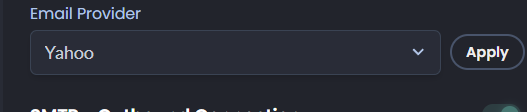
Once applied, the system will automatically populate all the correct connection details for you — including SMTP, IMAP, ports, and encryption settings. No manual configuration is needed.
This method ensures a quick and accurate setup, minimizing potential errors.
Manual Setup
📥 Incoming Mail (IMAP) Server
Use these settings to receive incoming emails:
- Server: imap.mail.yahoo.com
- Port: 993
- Requires SSL: Yes
IMAP allows you to sync your email across multiple devices while keeping messages stored on Yahoo’s servers.
📤 Outgoing Mail (SMTP) Server
Use these settings to send emails:
- Server: smtp.mail.yahoo.com
- Port: 465 or 587
- Requires SSL: Yes
- Requires Authentication: Yes
SMTP is responsible for sending outgoing emails through your Yahoo account.
⚠️ Important Notes
- If you have two-factor authentication enabled, you must generate and use an app password instead of your regular password.
- Make sure SSL/TLS encryption is enabled to avoid connection issues.
- Ports 465 (SSL) or 587 (TLS) are both supported for outgoing mail depending on your email client.