![startupscom-logo-420-1.png]](https://help.startups.com/hs-fs/hubfs/startupscom-logo-420-1.png?height=40&name=startupscom-logo-420-1.png)
Steps to Delete a Goal
- Go to your Goals workspace
- Log in to your Startups.com account.
- Go to Dashboard, where you'll find the workspace for your Goals.
- Select the Goal you want to delete
- Click Open on the Goal you want to delete
- Click Open on the Goal you want to delete
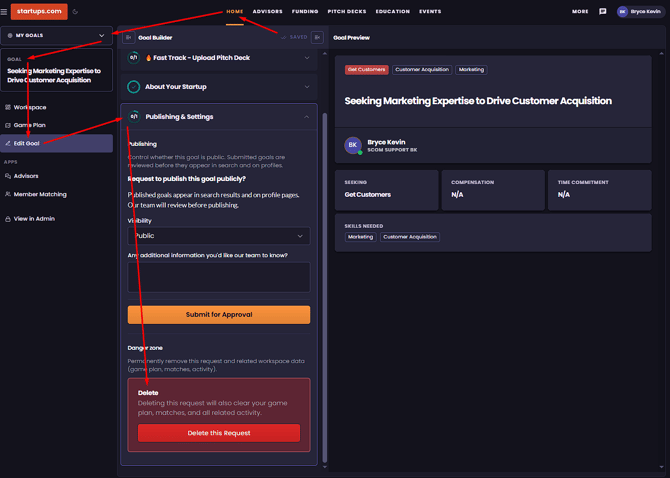
- Open Edit Goal
- Once the workspace for the selected Goal opens, click Edit Goal from the left navigation menu.
- Open Publishing & Settings
- In the Goal Builder navigation pane, scroll down and locate Publishing & Settings.
- Click to open the section.
- Delete the Goal
- Scroll to the bottom of Publishing & Settings.
- Click Delete this Request.
- Confirm the deletion.
Notes
- Deleting a Goal is permanent and cannot be undone.
- Deleting a Goal will also remove its related Game Plan and activity.
- The delete button is currently labeled Delete this Request, even though you are deleting a Goal.