![startupscom-logo-420-1.png]](https://help.startups.com/hs-fs/hubfs/startupscom-logo-420-1.png?height=40&name=startupscom-logo-420-1.png)
Messages sent to some investors may bounce due to strict spam filters, inbox restrictions on the investor’s side, or outdated or invalid email addresses. This is a common occurrence and is not a reflection of your pitch or startup.
If a message bounces, you can typically resend it to another contact at the same company or choose to replace that contact with another matched investor.
How to resend a bounced message
You can manage and resend bounced messages directly from the Message Activity & Tracking section.
-
Navigate to Message Activity & Tracking to view the full activity history of your outreach.
-
Click the Bounced tab to see a list of messages that were not successfully delivered.
-
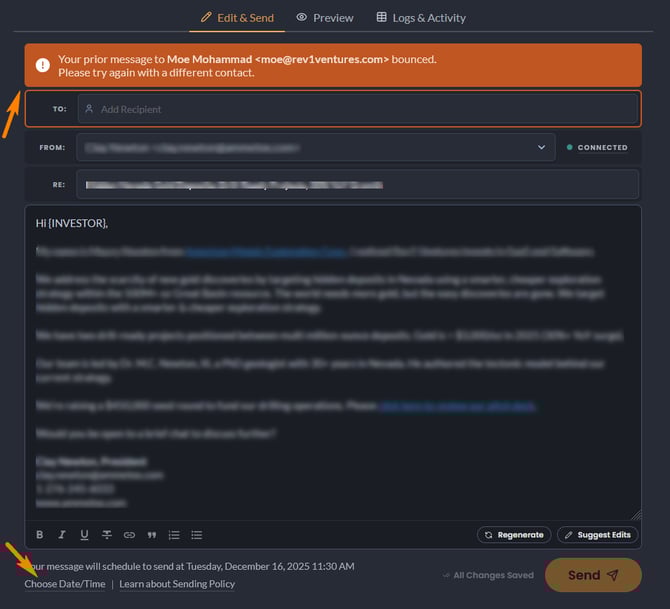
Select the Manage button next to the bounced message. This will open a window similar to composing a new message.
-
In the To field, select another available contact within the same company to resend the message.
Resending allows you to quickly redirect your outreach to another relevant contact so your message still has the opportunity to reach the right investor. As with all outgoing messages, each resend counts toward your daily sending cap.
Final step
Before sending, be sure to double-check the scheduled send date and time to ensure the message is sent as intended.